
Who took out the trash last? Did anyone buy dish soap? Whose turn is it to pay the internet bill?
In FamShare, your place gets its own group. Everyone in it shares one grocery list, one list of chores, and the bills with due dates and amounts. Your family, work or club plans stay in their own groups, and anything Private is visible only to you.
In this article
Step 1: Create a group for your place
- Everyone installs FamShare. You can try it on one phone with "Use Without Signing In", but to share you need an account: go to More > Account and tap Sign Up to Sync (Apple, Google or email). What you entered moves to your account.
- Go to More > Invite, create a new group and give it a name (for example "Apartment 4B").
- Send the invite code, the link or the QR code to your roommates. The code is valid for 7 days, and anyone who has it can join, so send it only to the people you mean.
- Your roommates open the link, or go to More > Join with Code and enter the code or scan the QR code.
Step 2: A shared grocery list
In the To-Do tab, choose your apartment group and create a category such as Groceries or Household. Anything in it is shared with everyone in the group.
- Anyone can add items ("Dish soap", "Paper towels", "Oat milk"), and checking one off updates everyone's list.
- Set who's doing the shopping on an item if you want to, so nobody buys the same thing twice.
- Checked-off items go to Trash, where you can find them again for 30 days.
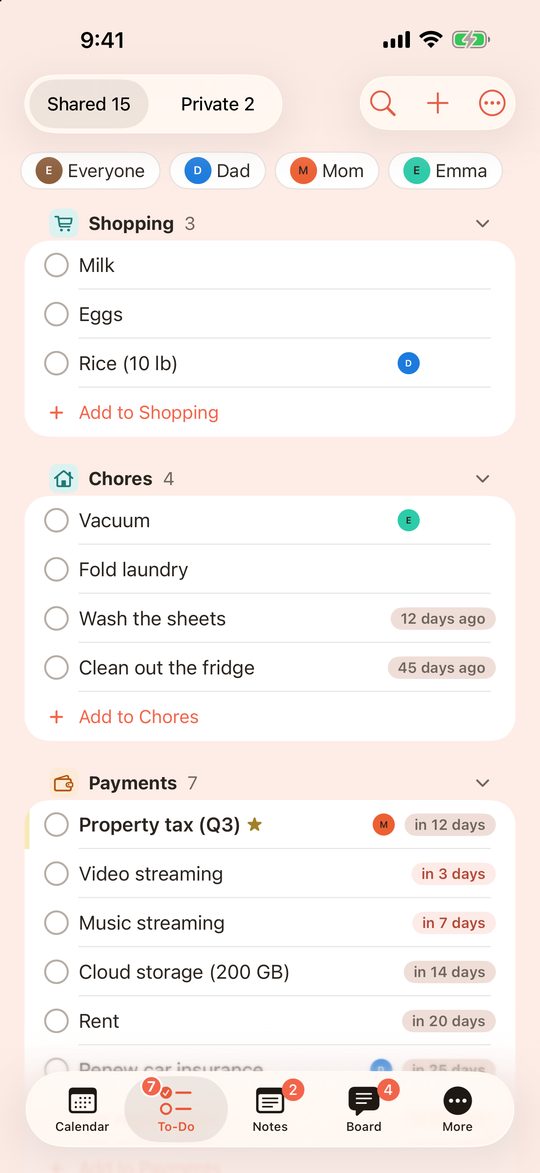
Step 3: Chores, repeats and days since
Create a Chores category in the same group. For each chore, you can set:
- Whose turn it is: put the name in the title, like "Clean the bathroom (Sam)", and change it when the turn changes.
- A due date and a repeat: for chores on a schedule, like "Trash and recycling, every Tuesday".
- Just Count Days: for chores that don't need a fixed date, like cleaning the fridge. The list shows how many days it has been since the chore was last done ("12 days ago"). When someone marks it done, it starts over from today, for everyone.
Example: setting up a few chores
| Chore | How to set it up |
|---|---|
| Trash and recycling | Due date + weekly repeat |
| Clean the bathroom | Due date + monthly repeat |
| Clean out the fridge | Just Count Days |
| Wash the shower curtain | Just Count Days |
Put regular things like trash day on the calendar too, so they show on the month view.
Step 4: Bills and who pays what
Create a Bills category in the apartment group and add each bill as a to-do:
- Add the bill (for example "Internet") and set the due date and a repeat (monthly, for example).
- Enter the amount.
- Put the name of who pays in the title, like "Internet (Alex)", so everyone can see who pays which bill.
The list shows how many days are left until each due date. Payment Totals in the To-Do tab adds up the amounts and repeats you entered, so you can see what the household is expected to pay each month and over the year.
Keep your own things private
- Private items: events with the 🔒 Private label, and to-dos and notes on the Private side of the To-Do and Notes tabs, are visible only to you.
- Labels choose who sees what: labels belong to your calendar. For each label, you choose which groups it shows in. For example, a "Home" label can show in the apartment group, while a label you don't show in any group stays visible only to you.
- Other groups stay separate: your family or club groups have their own lists, notes and Board. Your roommates aren't in them.
House meetings on the Board
- Each group has its own Board for short messages and stickers ("Plumber comes Thursday at 10").
- Use a date poll to pick a day for a deep clean, a move-out inspection or a house dinner.
- Keep house rules, the Wi-Fi details for guests or the landlord's contact in a shared note. You can attach photos, PDFs and links, or turn a note into a checklist.
FAQ
- Can my roommates see my family's events?
- No, not unless you choose to show them. Each group has its own space. You choose which groups each of your labels shows in, and Private items are visible only to you.
- Does FamShare split bills or send money?
- No. FamShare doesn't split bills, work out who owes whom, or move money. You can add bills as to-dos with an amount, a due date and the name of who pays, and see the planned totals. Settle up the way you already do.
- Is there a limit on how many roommates can join?
- Up to 50 members per group. FamShare is free and shows small banner ads.
- Do we all need accounts?
- To share, yes. You can try FamShare on one phone without signing in, but everyone who joins a group needs an account. You can sign up with Apple, Google or an email address.
- What happens when someone moves out?
- They leave the group in More > Group (any member can also remove another member there). Items under their own labels stay in their calendar, and items added to the group stay with the group. Earlier Board messages stay readable for everyone.
- We use both iPhone and Android. Is that OK?
- Yes. FamShare works on iPhone, iPad and Android, and there is a Web Version for your computer.
Try it
Start on your own with "Use Without Signing In". Sign up when you're ready to invite your roommates. Free, with small banner ads. No limit on members.